💥 Quick Tip: Go To Location
On Windows and Linux: CTRL+SHIFT+L
On Mac: CMD+SHIFT+L
When using Go To Location to go to a method, you can specify the exact line number you want to jump to, for example: CustomerDetailsWindow.Save#16
If the Code Editor is open, you can type just a line number, which is great for jumping around in long methods.
Change Xojo's Navigator setting to allow the search field at the top switch between Filter and Go To Location.
|
|
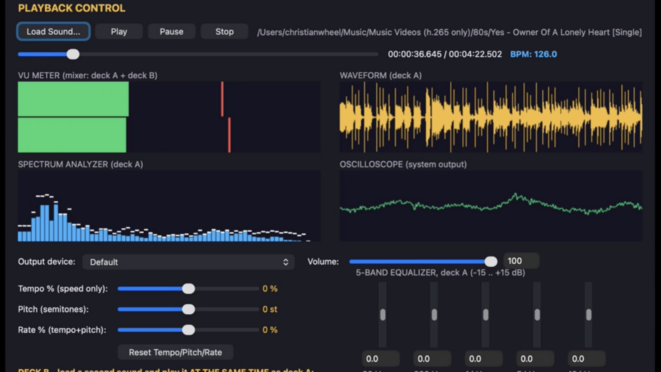
Forum Find of The Month: This is the farthest I've pushed Canvases
Xojo user Christian Wheel talks about his use of Xojo's Canvas to create a comprehensive cross-platform audio library!
"I’m getting the audio data from BASS. For the visualizers I get the realtime levels during playback, it does the FFT calculations into a memoryblock and gives me back a bunch of amplitude values to paint as a spectrum..."
|
|
Omegabundle 2026 Has Arrived!
Accelerate your development lifecycle and unlock professional-grade capabilities with Omegabundle for Xojo, a limited time, multi-vendor bundle. This year’s curated collection includes over $7,600 worth of elite third-party tools, plugins, and resources for Xojo—all for a one-time price of $399.99.
All products have received high value updates and improvements since they were last offered in Omegabundle.
|
|
get xojo
⬇️ Download Xojo 2026r2
Download the latest release of Xojo with all the newest features. No license is required to download, run and test your Xojo projects with new releases!
|
|
|